2026
CampusStudy AI
Live university-focused AI study platform with a Vercel frontend, Render FastAPI backend, RAG-grounded chat, notes, flashcards, quizzes, and study guides.
CampusStudy AI is a live university-focused AI study platform that helps students turn course materials into structured study support. The deployed system uses a Vercel-hosted Next.js frontend and a Render-hosted FastAPI backend, with repo support for an Expo mobile companion, Celery worker pipeline, PostgreSQL with pgvector, Redis, object storage, and provider abstractions for LLMs, embeddings, speech-to-text, and storage.
Generated from project structure
Live Full-Stack AI Study Platform
Vercel Web Frontend
Render FastAPI Backend
API Docs + Health
Celery Pipeline
Highlight
Live Vercel Frontend
Highlight
Render FastAPI Backend
Highlight
RAG-Grounded Chat
Highlight
Notes + Flashcards + Quizzes
Executive Summary
CampusStudy AI is a live university-focused AI study platform that helps students turn course materials into structured study support. The deployed system uses a Vercel-hosted Next.js frontend and a Render-hosted FastAPI backend, with repo support for an Expo mobile companion, Celery worker pipeline, PostgreSQL with pgvector, Redis, object storage, and provider abstractions for LLMs, embeddings, speech-to-text, and storage.
Problem Statement
Students often use disconnected tools for notes, slides, lecture recordings, quizzes, flashcards, study planning, and AI help. CampusStudy AI brings these workflows into one academic platform where uploaded course material can become searchable, structured, and reusable study outputs.
What I Built
Next.js student dashboard
Expo mobile companion
Material upload and processing pipeline
PDF, TXT, Markdown, DOCX, PPTX, audio, and video handling
RAG-grounded chat with citations
Generated notes, summaries, study guides, flashcards, and quizzes
Course, topic, enrollment, and university structure
Admin metrics and processing job visibility
How It Works
A conceptual workflow showing how the project moves from input to processing and output.
Step 1
Student Uploads Material
Step 2
Extract / Transcribe
Step 3
Chunk + Embed
Step 4
Generate Study Assets
Step 5
Ask with Citations
Step 6
Review Notes / Flashcards / Quizzes
Architecture / System Design
A simplified system view of the major project components and how responsibilities connect.
Step 1
Next.js Web Frontend on Vercel
Step 2
FastAPI Backend on Render
Step 3
SQLAlchemy Services
Step 4
Celery Workers
Step 5
PostgreSQL + pgvector / documented Render DATABASE_URL
Step 6
Redis + MinIO/S3 storage support
Step 7
LLM / Embedding / Speech Providers
Technical Implementation
Frontend
- Next.js App Router
- React 19
- Tailwind CSS
- React Query
- Recharts dashboard surfaces
- Vercel deployment
Mobile
- Expo Router
- React Native
- Course and study companion flows
- Secure local storage
Backend
- Render-hosted FastAPI API
- SQLAlchemy 2.0 models
- Alembic migrations
- Auth, courses, materials, notes, quizzes, chat, admin
AI / RAG
- Chunking and embeddings
- Citation-grounded retrieval
- LLM provider abstraction
- Generated notes, flashcards, quizzes, and study guides
Workers / Infra
- Celery pipeline
- Redis broker
- PostgreSQL + pgvector
- MinIO/S3-compatible storage
- Docker Compose local stack
Deployment
- Vercel frontend
- Render backend
- FastAPI docs endpoint
- Health endpoint
- CORS configured for Vercel origins
Testing / CI
- pytest backend tests
- ruff checks
- web lint/test/build
- mobile typecheck
- GitHub Actions CI
Live Deployment
Confirmed deployment links and environment notes from the project repository.
API Docs
FastAPI Swagger docsRender Startup
Docker startup runs migrations, seeds demo data, then starts Uvicorn
Documented Backend Env
DATABASE_URL, SECRET_KEY, LLM_PROVIDER, GROQ_API_KEY, GROQ_MODEL, CORS origins
Screenshots & Visuals
Real project screenshots and outputs appear first. Where a project has no existing screenshots, the visuals are grounded diagrams or output previews based on the actual project structure.
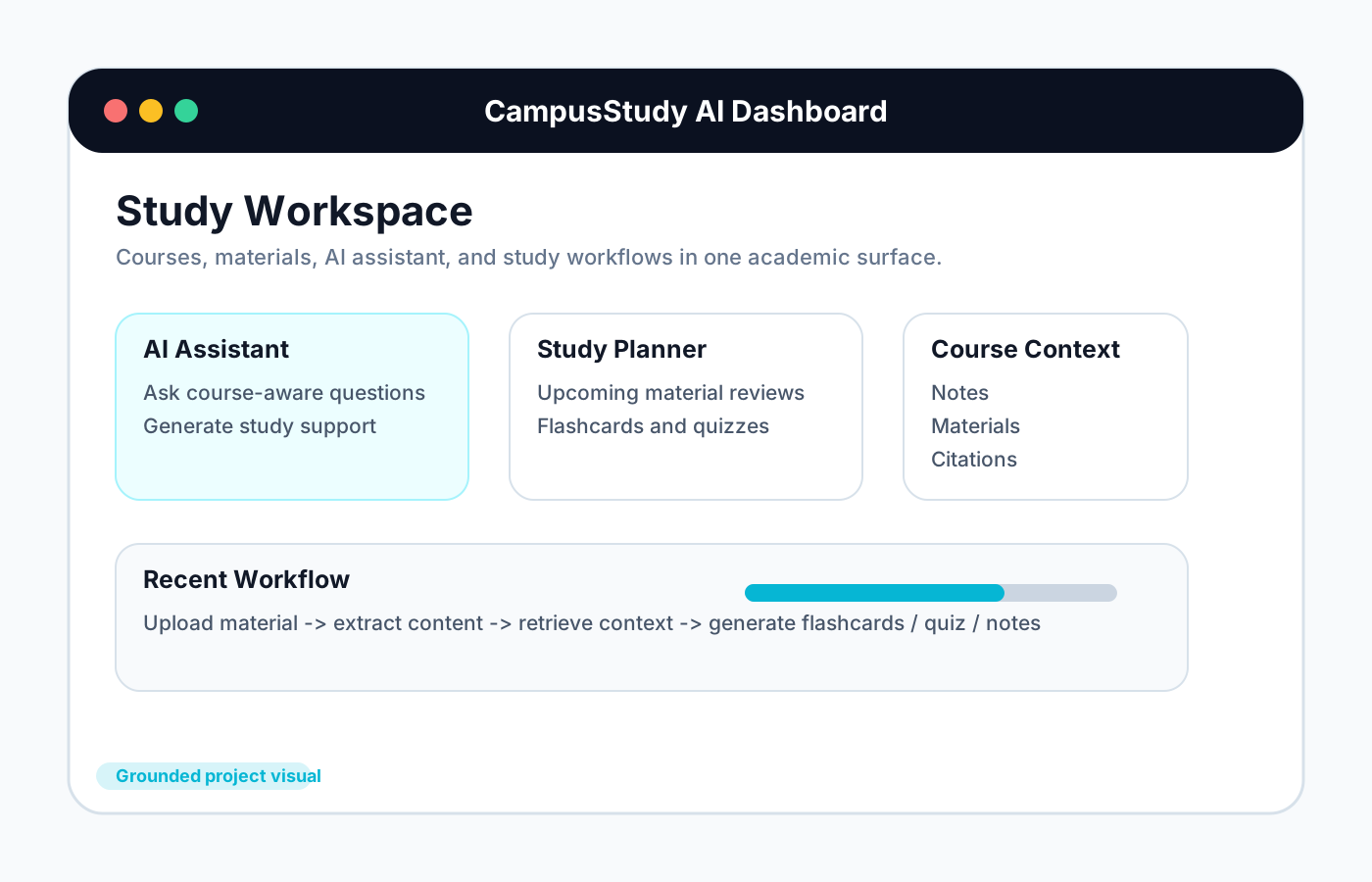
Study Workspace Diagram
Generated visual grounded in the latest repo routes for dashboard, courses, materials, notes, flashcards, quizzes, chat, and admin surfaces.
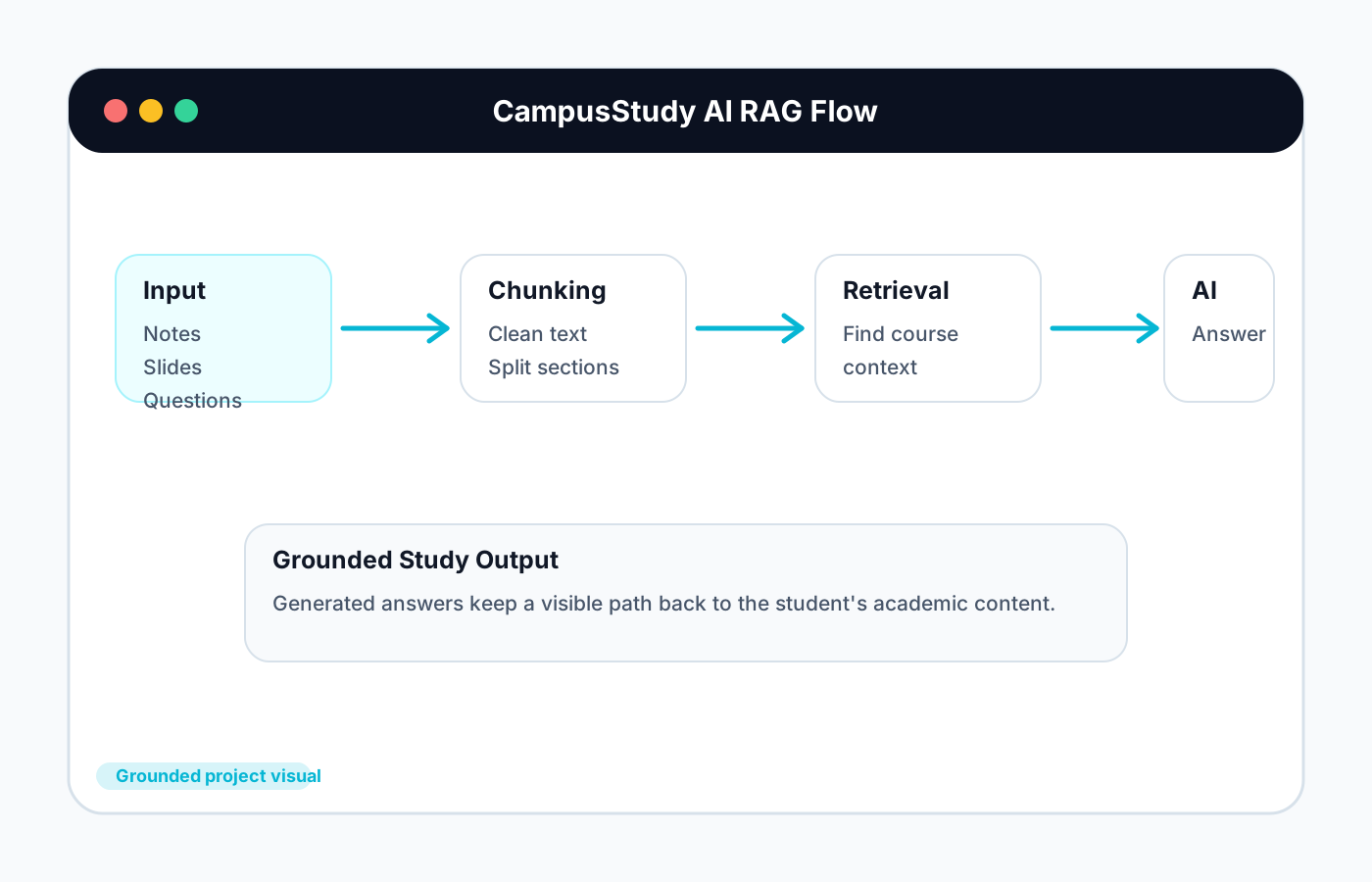
RAG + Citation Flow
Workflow diagram based on the implemented chunking, embedding, scoped retrieval, citation, and chat response services.
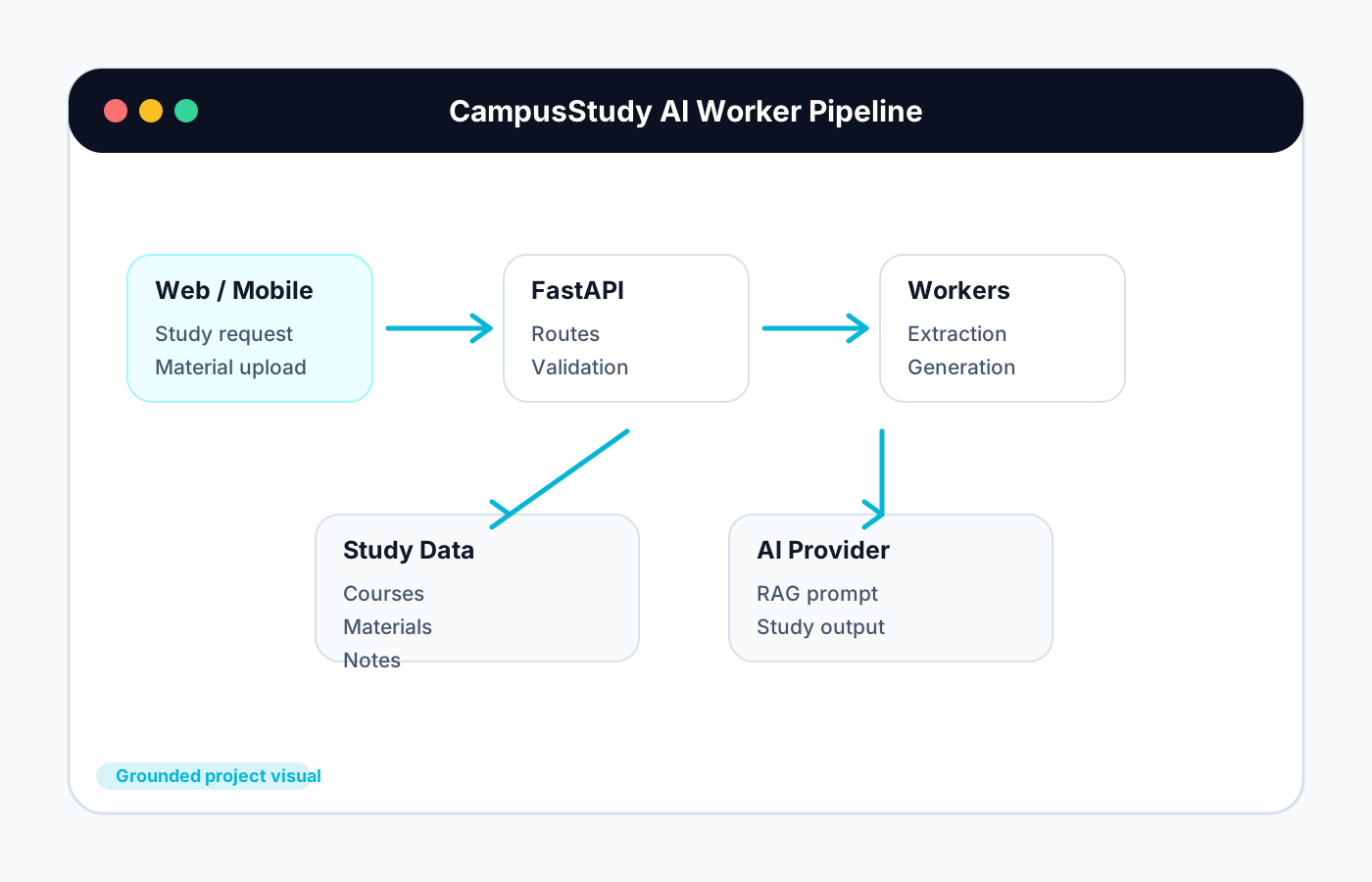
Background Processing Pipeline
Architecture visual grounded in the Celery processing statuses for extraction, transcription, chunking, embeddings, notes, flashcards, quizzes, and completion.
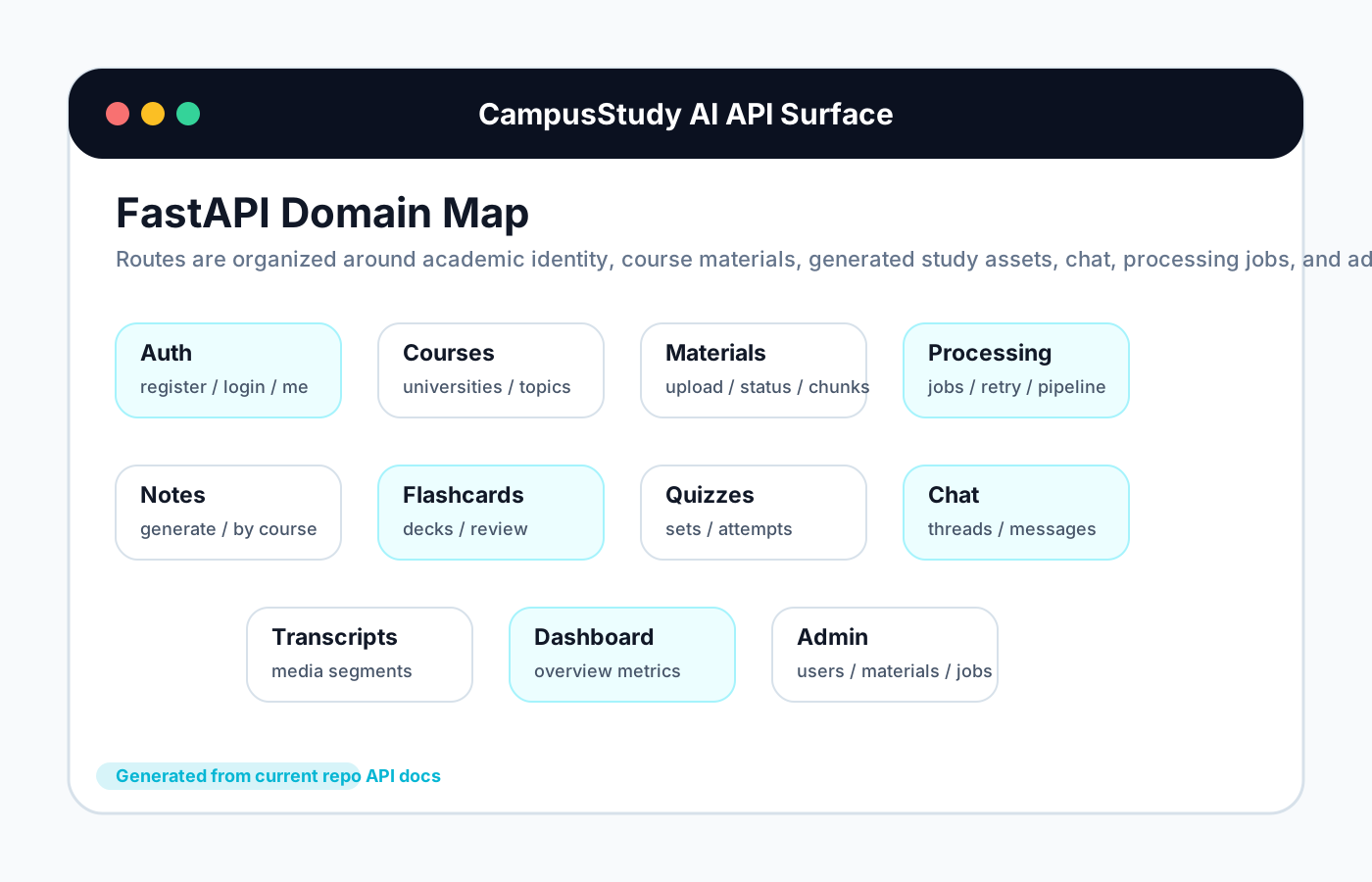
API Surface Map
Backend route map based on the current FastAPI API domains for auth, courses, materials, processing, notes, flashcards, quizzes, chat, transcripts, dashboard, and admin.
Live API + Confirmed API Surface
Frontend: https://campusstudy-ai-web.vercel.app
API base: https://campusstudy-ai.onrender.com/api/v1
Docs: https://campusstudy-ai.onrender.com/docs
Health: GET /api/v1/health -> {"status":"ok"}

POST /api/v1/materials/upload
GET  /api/v1/materials/{id}/chunks
GET  /api/v1/materials/{id}/status
POST /api/v1/notes/generate
POST /api/v1/flashcards/generate
POST /api/v1/quizzes/generate
POST /api/v1/chat/threads/{threadId}/messages
Challenges & Solutions
Challenge
Students need notes, flashcards, quizzes, study guides, and AI help from the same course material, but these workflows are usually split across separate tools.
Solution
CampusStudy AI centralizes materials, courses, generated study assets, and chat workflows in one web/mobile study platform.
Challenge
AI study answers need to stay connected to the uploaded lecture or course source material.
Solution
The backend chunks uploaded content, stores retrieval-ready embeddings, and returns citation-grounded chat answers from scoped material, topic, or course context.
Challenge
Long-running extraction, transcription, embedding, and generation work can block the user experience.
Solution
A Celery worker pipeline moves materials through explicit processing statuses while the web app can track jobs and surface generated results when ready.
Results / Impact
Demonstrates full-stack AI product engineering across web, mobile, backend APIs, background jobs, data modeling, and retrieval-based study workflows.
Shows practical education technology thinking by turning raw course material into notes, flashcards, quizzes, study guides, and cited AI assistance.
Uses a scalable architecture foundation with provider abstractions, worker queues, vector retrieval, and production guardrails instead of a single-page prototype.